

docs.json 文件可将一组 Markdown 文件构建成可导航、可自定义的文档站点。这个必需的配置文件控制样式、navigation、integrations 等设置,是你的文档的蓝图。
docs.json 中的设置会全局作用于所有页面。
配置你的 docs.json
theme、name、colors.primary 和 navigation。其他字段是可选的,可随着文档需求的增长逐步添加。
为获得最佳编辑体验,请在 docs.json 文件开头加入模式(schema)引用。这样可在大多数代码编辑器中启用自动补全、校验和实用的悬浮提示:
{
  "$schema": "https://mintlify.com/docs.json",
  "theme": "mint",
  "name": "您的文档",
  "colors": {
    "primary": "#ff0000"
  },
  "navigation": {
    // 您的导航结构
  }
  // 配置的其余部分
}
参考
docs.json 文件的完整参考资料。
自定义
string
必填
您的项目、组织或产品名称。
object
必填
文档中使用的配色。不同主题的应用方式不同。若仅提供主色,将用于所有相关颜色元素。
string
用于 SEO(搜索引擎优化)和 AI 索引编入的站点说明。
string or object
string or object
object
object
object
图标库设置。
显示 Icons
显示 Icons
"fontawesome" | "lucide"
必填
在整站文档中使用的图标库。默认为
fontawesome。无论库设置如何,你都可以为任意单个图标指定外部托管图标的 URL、项目中图标文件的路径,或兼容 JSX 的 SVG 代码。
object
文档的字体配置。默认字体为 Inter。
显示 Fonts
显示 Fonts
string
必填
字体系列,例如 “Open Sans”。
number
字重,例如 400 或 700。可变字体支持更精确的字重,例如 550。
string (uri)
字体来源的 URL,例如 https://mintlify-assets.b-cdn.net/fonts/Hubot-Sans.woff2。 当你指定 Google 字体的
family 名称时,Google Fonts 会自动加载,因此无需提供来源 URL。"woff" | "woff2"
字体文件格式。
object
专用于标题的字体覆盖设置。
显示 Heading
显示 Heading
string
必填
字体系列,例如 “Open Sans”“Playfair Display”。
number
字重,例如 400、700。可变字体支持更精确的字重,例如 550。
string (uri)
字体来源的 URL,例如 https://mintlify-assets.b-cdn.net/fonts/Hubot-Sans.woff2。 当你指定 Google 字体的
family 名称时,Google Fonts 会自动加载,因此无需提供来源 URL。"woff" | "woff2"
字体文件格式。
object
专用于正文的字体覆盖设置。
显示 Body
显示 Body
string
必填
字体系列,例如 “Open Sans”“Playfair Display”。
number
字重,例如 400、700。可变字体支持更精确的字重,例如 550。
string (uri)
字体来源的 URL,例如 https://mintlify-assets.b-cdn.net/fonts/Hubot-Sans.woff2。 当你指定 Google 字体的
family 名称时,Google Fonts 会自动加载,因此无需提供来源 URL。"woff" | "woff2"
字体文件格式。
object
object
背景颜色与装饰的设置。
显示 Background
显示 Background
string or object
"gradient" | "grid" | "windows"
主题的背景装饰效果。
结构
object
指向外部链接的导航栏条目。
显示 Navbar
显示 Navbar
array of object
要在导航栏中显示的链接
显示 Links
显示 Links
string
必填
链接文本。
string (uri)
必填
链接目标。必须是有效的外部 URL。
string
要显示的 icon。选项:
- Font Awesome icon 名称
- Lucide icon 名称
- 用花括号包裹的 JSX 兼容 SVG 代码
- 指向外部托管 icon 的 URL
- 项目中 icon 文件的路径
- 使用 SVGR 转换器将你的 SVG 转换为 JSX。
- 将 SVG 代码粘贴到 SVG 输入框。
- 从 JSX 输出框中复制完整的
<svg>...</svg>元素。 - 用花括号包裹 JSX 兼容的 SVG 代码:
icon={<svg ...> ... </svg>}。 - 按需调整
height和width。
string
Font Awesome icon 的样式。仅在使用 Font Awesome icon 时生效。选项:
regular、solid、light、thin、sharp-solid、duotone、brands。object
必填
您内容的导航结构。
显示 导航
显示 导航
object
在所有页面和章节中显示的全局导航元素。
显示 全局
显示 全局
array of object
array of object
array of object
用于组织主要版块的顶层导航选项卡。
显示 Tabs
显示 Tabs
string
必填
标签页的显示名称。最小长度:1
string
要显示的 icon。选项:
- Font Awesome icon 名称
- Lucide icon 名称
- 用花括号包裹的 JSX 兼容 SVG 代码
- 指向外部托管 icon 的 URL
- 项目中 icon 文件的路径
- 使用 SVGR 转换器将你的 SVG 转换为 JSX。
- 将 SVG 代码粘贴到 SVG 输入框。
- 从 JSX 输出框中复制完整的
<svg>...</svg>元素。 - 用花括号包裹 JSX 兼容的 SVG 代码:
icon={<svg ...> ... </svg>}。 - 按需调整
height和width。
string
Font Awesome icon 的样式。仅在使用 Font Awesome icon 时生效。选项:
regular、solid、light、thin、sharp-solid、duotone、brands。boolean
是否默认隐藏此标签页。
string (uri)
必填
指向该标签页目标的 URL 或路径。
array of object
在侧边栏导航中醒目显示的锚点链接。
显示 Anchors
显示 Anchors
string
必填
锚点的显示名称。最小长度:1
string
要显示的 icon。选项:
- Font Awesome icon 名称
- Lucide icon 名称
- 用花括号包裹的 JSX 兼容 SVG 代码
- 指向外部托管 icon 的 URL
- 项目中 icon 文件的路径
- 使用 SVGR 转换器将你的 SVG 转换为 JSX。
- 将 SVG 代码粘贴到 SVG 输入框。
- 从 JSX 输出框中复制完整的
<svg>...</svg>元素。 - 用花括号包裹 JSX 兼容的 SVG 代码:
icon={<svg ...> ... </svg>}。 - 按需调整
height和width。
string
Font Awesome icon 的样式。仅在使用 Font Awesome icon 时生效。选项:
regular、solid、light、thin、sharp-solid、duotone、brands。object
boolean
是否默认隐藏此锚点。
string (uri)
必填
指向锚点目标的 URL 或路径。
array of object
用于组织相关内容的下拉菜单。
显示 Dropdowns
显示 Dropdowns
string
必填
下拉菜单的显示名称。最小长度:1
string
要显示的 icon。选项:
- Font Awesome icon 名称
- Lucide icon 名称
- 用花括号包裹的 JSX 兼容 SVG 代码
- 指向外部托管 icon 的 URL
- 项目中 icon 文件的路径
- 使用 SVGR 转换器将你的 SVG 转换为 JSX。
- 将 SVG 代码粘贴到 SVG 输入框。
- 从 JSX 输出框中复制完整的
<svg>...</svg>元素。 - 用花括号包裹 JSX 兼容的 SVG 代码:
icon={<svg ...> ... </svg>}。 - 按需调整
height和width。
string
Font Awesome icon 的样式。仅在使用 Font Awesome icon 时生效。选项:
regular、solid、light、thin、sharp-solid、duotone、brands。boolean
是否默认隐藏该下拉菜单。
string (uri)
必填
下拉菜单目标的 URL 或路径。
object
导航元素的用户交互设置。
显示 Interaction
显示 Interaction
boolean
控制选择导航分组时的自动导航行为。设为
true 时,在展开导航分组时强制进入第一篇页面。设为 false 时不跳转,仅展开或折叠该分组。留空则使用主题的默认行为。object
页脚内容与社交媒体链接。
显示 Footer
显示 Footer
object
要在页脚中显示的社交媒体帐号。每个 key 为平台名称,每个 value 为你的个人资料 URL。例如:可用的属性名称:
{
  "x": "https://x.com/mintlify"
}
x、website、facebook、youtube、discord、slack、github、linkedin、instagram、hacker-news、medium、telegram、twitter、x-twitter、earth-americas、bluesky、threads、reddit、podcastobject
array of object
object
用于 AI 优化内容和集成的上下文菜单。
显示 Contextual
显示 Contextual
array of "copy" | "view" | "chatgpt" | "claude" | "perplexity" | "mcp" | "cursor" | "vscode"
必填
上下文菜单中的可用操作。第一个选项将作为默认项显示。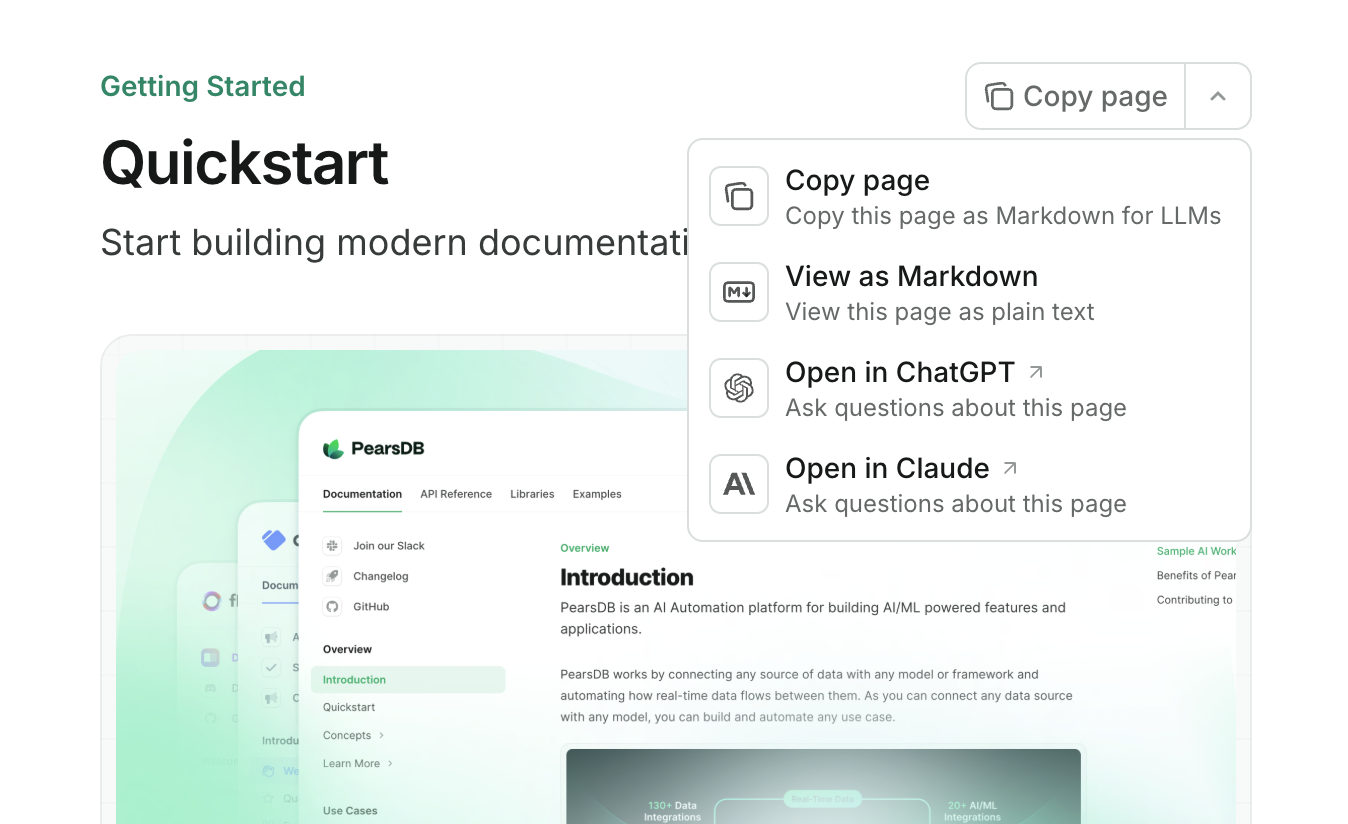
copy:将当前页面以 Markdown 形式复制到剪贴板。view:在新标签页中以 Markdown 查看当前页面。chatgpt:将当前页面内容发送到 ChatGPT。claude:将当前页面内容发送到 Claude。perplexity:将当前页面内容发送到 Perplexity。mcp:将你的 MCP 服务器 URL 复制到剪贴板。cursor:在 Cursor 中安装你托管的 MCP 服务器。vscode:在 VSCode 中安装你托管的 MCP 服务器。
上下文菜单仅在预览和生产部署中可用。
API 配置
object
API 文档与交互式操作台的相关设置。
显示 Api
显示 Api
string or array or object
string or array or object
object
object
SEO 与搜索
object
SEO(搜索引擎优化)索引配置。
显示 Seo
显示 Seo
object
添加到每个页面的 Meta 标签。必须是有效的 key-value 键值对。可在 常用 Meta 标签参考 中查看可选项。
"navigable" | "all"
指定哪些页面应被搜索引擎收录。选择
navigable 仅收录 docs.json 的 navigation 中的页面,选择 all 则收录所有页面。默认值为 navigable。集成
object
第三方集成。
显示 集成
显示 集成
object
Google Analytics 4 集成。
显示 Ga4
显示 Ga4
string matching ^G
必填
您的 Google Analytics 4 measurement ID。必须符合模式:^G
object
object
错误
object
示例
- 基础示例
- 交互式 API 示例
- 多语言示例
docs.json
{
  "$schema": "https://mintlify.com/docs.json",
  "theme": "maple",
  "name": "Example Co.",
  "description": "Example Co. 是一家提供示例内容和占位符文本的公司。",
  "colors": {
    "primary": "#3B82F6",
    "light": "#F8FAFC",
    "dark": "#0F172A"
  },
  "navigation": {
    "dropdowns": [
      {
        "dropdown": "文档",
        "icon": "book",
        "description": "如何使用 Example Co. 产品",
        "groups": [
          {
            "group": "快速开始",
            "pages": [
              "index",
              "quickstart"
            ]
          },
          {
            "group": "自定义配置",
            "pages": [
              "settings",
              "users",
              "features"
            ]
          },
          {
            "group": "计费管理",
            "pages": [
              "billing/overview",
              "billing/payments",
              "billing/subscriptions"
            ]
          }
        ]
      },
      {
        "dropdown": "更新日志",
        "icon": "history",
        "description": "产品更新和变更记录",
        "pages": [
          "changelog"
        ]
      }
    ]
  },
  "logo": {
    "light": "/logo-light.svg",
    "dark": "/logo-dark.svg",
    "href": "https://example.com"
  },
  "navbar": {
    "links": [
      {
        "label": "社区",
        "href": "https://example.com/community"
      }
    ],
    "primary": {
      "type": "button",
      "label": "立即开始",
      "href": "https://example.com/start"
    }
  },
  "footer": {
    "socials": {
      "x": "https://x.com/example",
      "linkedin": "https://www.linkedin.com/company/example",
      "github": "https://github.com/example",
      "slack": "https://example.com/community"
    },
    "links": [
      {
        "header": "资源",
        "items": [
          {
            "label": "客户案例",
            "href": "https://example.com/customers"
          },
          {
            "label": "企业版",
            "href": "https://example.com/enterprise"
          },
          {
            "label": "申请试用",
            "href": "https://example.com/preview"
          }
        ]
      },
      {
        "header": "公司",
        "items": [
          {
            "label": "招聘信息",
            "href": "https://example.com/careers"
          },
          {
            "label": "博客",
            "href": "https://example.com/blog"
          },
          {
            "label": "隐私政策",
            "href": "https://example.com/legal/privacy"
          }
        ]
      }
    ]
  },
  "integrations": {
    "ga4": {
      "measurementId": "G-XXXXXXXXXX"
    },
    "koala": {
      "publicApiKey": "pk_example_key_123"
    },
    "telemetry": {
      "enabled": true
    },
    "cookies": {
      "key": "example_cookie_key",
      "value": "example_cookie_value"
    }
  },
  "contextual": {
    "options": [
      "copy",
      "view",
      "chatgpt",
      "claude"
    ]
  },
  "errors": {
    "404": {
      "redirect": false,
      "title": "页面未找到",
      "description": "这个_页面_到底**怎么了**?"
    }
  }
}
docs.json
{
  "$schema": "https://mintlify.com/docs.json",
  "theme": "maple",
  "name": "Example Co.",
  "description": "Example Co. 是一家提供示例内容和占位符文本的公司。",
  "colors": {
    "primary": "#3B82F6",
    "light": "#F8FAFC",
    "dark": "#0F172A"
  },
  "navigation": {
    "dropdowns": [
      {
        "dropdown": "文档",
        "icon": "book",
        "description": "如何使用 Example Co. 产品",
        "groups": [
          {
            "group": "快速入门",
            "pages": [
              "index",
              "quickstart"
            ]
          },
          {
            "group": "自定义配置",
            "pages": [
              "settings",
              "users",
              "features"
            ]
          },
          {
            "group": "计费管理",
            "pages": [
              "billing/overview",
              "billing/payments",
              "billing/subscriptions"
            ]
          }
        ]
      },
      {
        "dropdown": "API 参考",
        "icon": "terminal",
        "description": "如何使用 Example Co. API",
        "groups": [
          {
            "group": "API 参考",
            "pages": [
              "api-reference/introduction"
            ]
          },
          {
            "group": "接口端点",
            "openapi": {
              "source": "openapi.json"
            }
          }
        ]
      },
      {
        "dropdown": "更新日志",
        "icon": "history",
        "description": "更新和变更记录",
        "pages": [
          "changelog"
        ]
      }
    ]
  },
  "api": {
    "playground": {
      "display": "interactive"
    },
    "examples": {
      "languages": ["javascript", "curl", "python"]
    }
  },
  "logo": {
    "light": "/logo-light.svg",
    "dark": "/logo-dark.svg",
    "href": "https://example.com"
  },
  "navbar": {
    "links": [
      {
        "label": "社区",
        "href": "https://example.com/community"
      }
    ],
    "primary": {
      "type": "button",
      "label": "立即开始",
      "href": "https://example.com/start"
    }
  },
  "footer": {
    "socials": {
      "x": "https://x.com/example",
      "linkedin": "https://www.linkedin.com/company/example",
      "github": "https://github.com/example",
      "slack": "https://example.com/community"
    },
    "links": [
      {
        "header": "资源",
        "items": [
          {
            "label": "客户案例",
            "href": "https://example.com/customers"
          },
          {
            "label": "企业版",
            "href": "https://example.com/enterprise"
          },
          {
            "label": "申请预览",
            "href": "https://example.com/preview"
          }
        ]
      },
      {
        "header": "公司",
        "items": [
          {
            "label": "招聘信息",
            "href": "https://example.com/careers"
          },
          {
            "label": "博客",
            "href": "https://example.com/blog"
          },
          {
            "label": "隐私政策",
            "href": "https://example.com/legal/privacy"
          }
        ]
      }
    ]
  },
  "integrations": {
    "ga4": {
      "measurementId": "G-XXXXXXXXXX"
    },
    "koala": {
      "publicApiKey": "pk_example_key_123"
    },
    "telemetry": {
      "enabled": true
    },
    "cookies": {
      "key": "example_cookie_key",
      "value": "example_cookie_value"
    }
  },
  "contextual": {
    "options": [
      "copy",
      "view",
      "chatgpt",
      "claude"
    ]
  },
  "errors": {
    "404": {
      "redirect": false,
      "title": "页面未找到",
      "description": "这个**页面**到底_去哪了_?"
    }
  }
}
docs.json
{
  "$schema": "https://mintlify.com/docs.json",
  "theme": "maple",
  "name": "Example Co.",
  "description": "Example Co. 是一家提供示例内容和占位符文本的公司。",
  "colors": {
    "primary": "#3B82F6",
    "light": "#F8FAFC",
    "dark": "#0F172A"
  },
  "navigation": {
    "global": {
      "anchors": [
        {
          "anchor": "文档",
          "href": "https://mintlify.com/docs"
        },
        {
          "anchor": "更新日志",
          "href": "https://mintlify.com/docs/changelog"
        }
      ]
    },
    "languages": [
      {
        "language": "en",
        "dropdowns": [
          {
            "dropdown": "文档",
            "icon": "book",
            "description": "如何使用 Example Co. 产品",
            "pages": [
              {
                "group": "快速入门",
                "pages": ["index", "quickstart"]
              },
              {
                "group": "自定义配置",
                "pages": ["settings", "users", "features"]
              },
              {
                "group": "计费管理",
                "pages": [
                  "billing/overview",
                  "billing/payments",
                  "billing/subscriptions"
                ]
              }
            ]
          },
          {
            "dropdown": "更新日志",
            "icon": "history",
            "description": "更新和变更记录",
            "pages": ["changelog"]
          }
        ]
      },
      {
        "language": "es",
        "dropdowns": [
          {
            "dropdown": "文档",
            "icon": "book",
            "description": "如何使用 Example Co. 产品",
            "pages": [
              {
                "group": "快速入门",
                "pages": ["es/index", "es/quickstart"]
              },
              {
                "group": "自定义配置",
                "pages": ["es/settings", "es/users", "es/features"]
              },
              {
                "group": "计费管理",
                "pages": [
                  "es/billing/overview",
                  "es/billing/payments",
                  "es/billing/subscriptions"
                ]
              }
            ]
          },
          {
            "dropdown": "更新日志",
            "icon": "history",
            "description": "更新和变更记录",
            "pages": ["es/changelog"]
          }
        ]
      }
    ]
  },
  "logo": {
    "light": "/logo-light.svg",
    "dark": "/logo-dark.svg",
    "href": "https://example.com"
  },
  "navbar": {
    "links": [
      {
        "label": "社区",
        "href": "https://example.com/community"
      }
    ],
    "primary": {
      "type": "button",
      "label": "立即开始",
      "href": "https://example.com/start"
    }
  },
  "footer": {
    "socials": {
      "x": "https://x.com/example",
      "linkedin": "https://www.linkedin.com/company/example",
      "github": "https://github.com/example",
      "slack": "https://example.com/community"
    },
    "links": [
      {
        "header": "资源",
        "items": [
          {
            "label": "客户案例",
            "href": "https://example.com/customers"
          },
          {
            "label": "企业版",
            "href": "https://example.com/enterprise"
          },
          {
            "label": "申请试用",
            "href": "https://example.com/preview"
          }
        ]
      },
      {
        "header": "公司",
        "items": [
          {
            "label": "招聘信息",
            "href": "https://example.com/careers"
          },
          {
            "label": "博客",
            "href": "https://example.com/blog"
          },
          {
            "label": "隐私政策",
            "href": "https://example.com/legal/privacy"
          }
        ]
      }
    ]
  },
  "integrations": {
    "ga4": {
      "measurementId": "G-XXXXXXXXXX"
    },
    "koala": {
      "publicApiKey": "pk_example_key_123"
    },
    "telemetry": {
      "enabled": true
    },
    "cookies": {
      "key": "example_cookie_key",
      "value": "example_cookie_value"
    }
  },
  "contextual": {
    "options": ["copy", "view", "chatgpt", "claude"]
  },
  "errors": {
    "404": {
      "redirect": false,
      "title": "页面未找到",
      "description": "这个**页面**到底_怎么了_?"
    }
  }
}
从 mint.json 升级
mint.json 文件,请按以下步骤升级到 docs.json。
1
安装或更新命令行界面(CLI)
如果你尚未安装命令行界面(CLI),请先安装:如果你已经安装了 CLI,请确保更新至最新版本:
npm i -g mint
yarn global add mint
pnpm add -g mint
mint update
2
创建 docs.json 文件
在你的文档存储库中运行:该命令会基于现有的
mint upgrade
mint.json 生成一个 docs.json 文件。请检查生成的文件,确保所有设置正确。3
删除 mint.json 文件
在确认
docs.json 配置无误后,你即可安全删除旧的 mint.json 文件。