> ## Documentation Index
> Fetch the complete documentation index at: https://omer-914cc1c6.mintlify.site/llms.txt
> Use this file to discover all available pages before exploring further.
# Osano
在你的 `docs.json` 文件中添加以下内容,以集成 [Osano](https://www.osano.com/) Cookie 同意管理器。
```json Integration options in docs.json theme={null}
"integrations": {
"osano": "SOURCE"
}
```
```json 示例 theme={null}
"integrations": {
"osano": "https://cmp.osano.com/2sUB2dqwqdkks/8dqwd-dwd86£-4a9b/osano.js"
}
```
`SOURCE` 可在 Osano 生成的代码片段中找到,对应 `src` 的值。它始终以 `https://cmp.osano.com/` 开头。
```html Code snippet from Osano theme={null}
```
## 疑难解答
如果在使用 Osano 的 **Strict** 合规模式时,文档页面无法正常加载,你需要将 Mintlify 的 domain 加入允许列表,以便加载图片和其他资源。
在你的 Osano 控制台中,进入 **Scripts** → **Managed Rules**。
将 `.mintlify.app/` 添加为一个 managed rule。
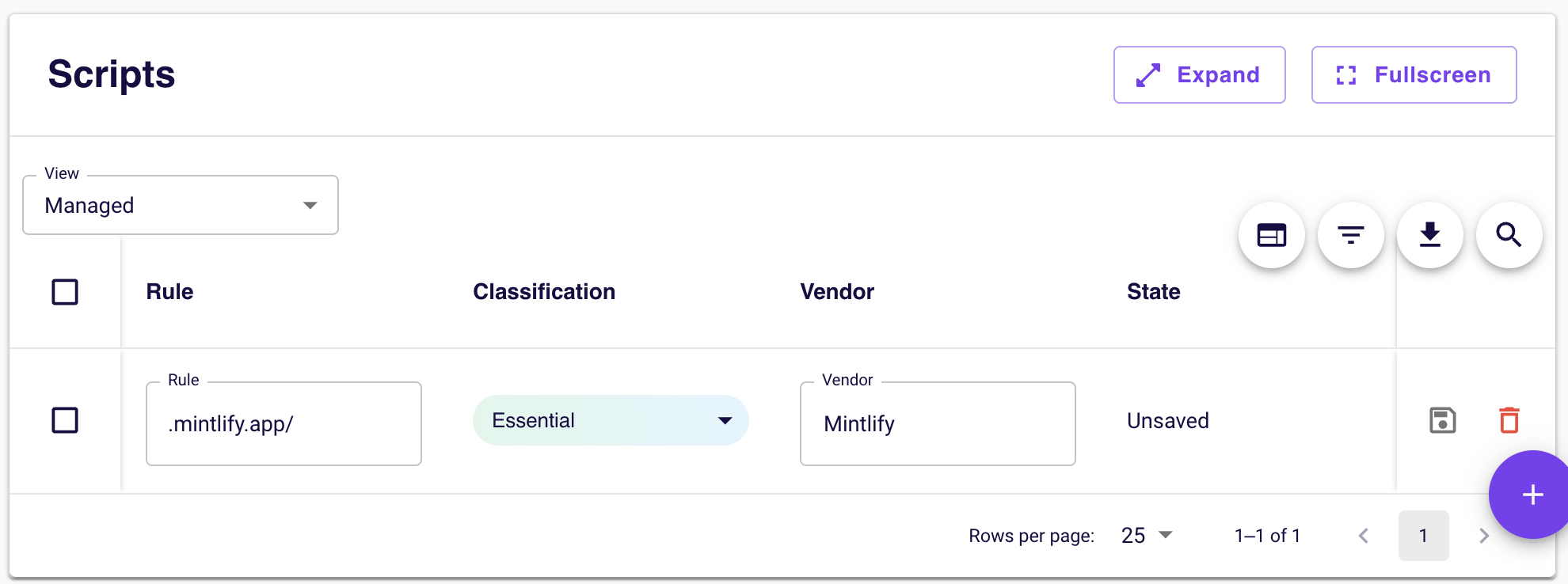 这可确保所有由 Mintlify 提供的资源(包括图片、样式表和其他文档资源)都被视为必要资源,即使 Osano 阻止未分类的第三方 content 时也能加载。